
A quick disclosure before we start
Full disclosure: I build one of the tools on this list (wptaskify). I have tried to be straight about where it wins and where it does not. You will see it lose a few categories below.
At the end of 2025 the WordPress MCP space was practically empty. By late 2026 there are more than ten real options, aimed at very different people.
How this list was made: in July 2026 I connected the official adapter, WordPress.com, InstaWP, seowriting.ai, docdyhr/mcp-wordpress and wptaskify to a live site and put them through the same tasks: list posts, write and publish an article, fix on-page SEO, and where possible touch a product. The newer entries (AI Engine, WPVibe, Royal MCP, Easy MCP AI, Novamira and miniOrange) were added on 20 October 2026 from their official listings and documentation, and each one says so. Prices and tool counts change often, so check the vendor page before you buy.
First, what a WordPress MCP server actually is
MCP stands for Model Context Protocol. It is an open standard that lets an AI client, such as Claude or ChatGPT, call an external service's tools through a clear contract. Instead of the AI guessing at REST API calls, the service declares exactly what it can do, and the AI calls those tools when you ask.
A WordPress MCP server is the piece that exposes your site's abilities (create a post, upload an image, edit SEO) as tools. The MCP client is your AI app that uses them. This is where most people get confused: you install or enable a server on the WordPress side, then add its link to your AI client on the other side.
The key point is that MCP does not just make the AI write text. It lets the AI act: publish, edit, optimize, upload. The difference in practice looks like this:
- Before: ask ChatGPT for an article, copy it, open WP admin, paste, format, fill the meta fields, publish.
- After: "Write and publish an SEO post about X." Done.
If you have not connected a site yet, our step-by-step guide to connecting WordPress to Claude or ChatGPT walks through the whole flow.
The 2026 landscape at a glance
The quick comparison. Tool counts are the vendor's own published figure where one exists; where there is no fixed number the cell says so, because a wrong number would be worse than an honest one.
| MCP server | Best for | Runs where | Price | Tools |
|---|---|---|---|---|
| WordPress MCP Adapter (official) | Developers on WordPress 6.9+ | On your site | Free | Whatever abilities you register |
| WordPress.com MCP | Sites hosted on WordPress.com | Hosted by WordPress.com | Paid WordPress.com plans | Curated set |
| InstaMCP (InstaWP) | Testing AI on staging sites | Hosted, InstaWP sites | InstaWP plans | 43 |
| AI Engine (Meow Apps) | Sites already using AI Engine | On your site | Free core, paid Pro | Core set free, more in Pro |
| WPVibe | Quick setup, page-builder sites | Plugin plus hosted relay | Free plugin, check usage limits | No fixed count |
| Royal MCP | Self-hosted sites that want an audit log | On your site | Free (GPL) | 127 |
| Easy MCP AI | A free, large tool list | On your site | Free | About 170 |
| Novamira | Developers who want PHP, WP-CLI and file access | On your site | Free core, Pro from 49 euros a year | 41 |
| miniOrange Secure MCP | Teams that need role-based permissions | On your site | Paid tiers | No fixed count |
| seowriting.ai MCP | Article writing only | Plugin | Paid plans | Content only |
| docdyhr/mcp-wordpress | Terminal users managing several sites | Your computer | Free, open source | Broad REST coverage |
| wptaskify | Content, SEO and a store from Claude or ChatGPT, no code | Plugin plus hosted server | Free tier, paid from $19 a month | 440+ tools |
One thing that decides a lot: ChatGPT and Claude on the web can only reach a server with a public URL. Servers that run on your computer (marked "Your computer") work with desktop apps such as Claude Desktop, Cursor or Claude Code, not with ChatGPT.
1. WordPress MCP Adapter (the official one)
This is the official server, built on the WordPress Abilities API that shipped in WordPress 6.9. It is part of the WordPress AI Building Blocks initiative, and the Abilities API is on track to merge into WordPress 7.0 core. In other words, this is the foundation the rest of the ecosystem is being built on.
What is good:
- Vendor-neutral, free and official.
- Any plugin can register its own abilities, so the surface area grows with the ecosystem.
- Long term, this becomes the shared base layer that other tools sit on.
What is not:
- Setup is developer-level: GitHub releases, Composer, config files.
- The bare adapter ships with very few abilities. To make it useful you register your own.
- It is not practical for a non-technical user today.
Verdict: if you are a developer building custom abilities, this is the right place. It is a foundation, not a finished product. It is not a competitor to the hosted connectors so much as the layer beneath them. You can read the official details on developer.wordpress.org and the code on github.com/WordPress/mcp-adapter.
2. WordPress.com MCP
WordPress.com ships MCP built into its paid plans. There is no plugin to install. It exposes 60 or more curated tools and authenticates with OAuth 2.1, which means you never share a password and can revoke the token at any time.
What is good: setup is effectively nothing, and the security model is the cleanest of the bunch. Token-based auth you can revoke beats copying an application password around.
What is not: it only works on WordPress.com. Self-hosted sites get nothing here. The tool set is curated rather than exhaustive, so deep SEO work or store operations are limited.
Verdict: if you are on WordPress.com, use this and stop looking. See the docs at developer.wordpress.com/docs/mcp.
3. InstaMCP (InstaWP)
InstaWP offers a managed MCP, InstaMCP, that you switch on with a toggle. It is integrated with staging environments, so there is no Node.js setup and no application password to manage. InstaWP lists 43 tools, with PHP, database and file tools off by default, and the hosted endpoint works with Claude and ChatGPT. It only covers sites hosted on InstaWP; their open source mcp-wp package runs locally for other sites.
What is good: this is the best option for testing. Trying an AI workflow on a sandbox before you point it at a client's live site is genuinely smart, and InstaWP is built exactly for that.
What is not: its primary focus is the dev and staging workflow, not ongoing content operations. It is a place to experiment, not a production content engine.
Verdict: reach for InstaWP to test AI workflows safely. For a day-to-day content and SEO engine, it is not the target.
4. AI Engine (Meow Apps)
AI Engine is a long-running WordPress AI plugin (chatbots, content, forms) that now includes an MCP server. Meow Apps says ChatGPT, Claude, Claude Code and other MCP clients can manage a site through it. Described from the vendor's page, not our own test.
What is good: if AI Engine is already on your site, MCP is a setting away, with no new plugin to trust. The core plugin is free.
What is not: MCP is one feature inside a large AI plugin, so it is heavy if MCP is all you want. Some tools sit in the paid Pro version, and its own AI features bill your OpenAI, Claude or Gemini key separately.
Verdict: the natural pick for existing AI Engine users. See meowapps.com, or our wptaskify vs AI Engine comparison.
5. WPVibe
WPVibe, from the team behind SeedProd and WPBeginner, is a free plugin paired with a hosted relay at wpvibe.ai. You add one MCP URL to your AI client and approve the site from your dashboard, and the relay handles OAuth. Described from its WordPress.org listing.
What is good: very quick setup that works with ChatGPT, Claude and Cursor, and covers content, media, theme files and plugin abilities.
What is not: the relay is hosted and is not part of the open source plugin, so you depend on their service. Check their current usage limits before relying on it daily.
Verdict: a good no-code starting point, especially on page-builder sites. Compare it in wptaskify vs WPVibe.
6. Royal MCP
Royal MCP is a free GPL plugin in the WordPress.org directory that turns the site into a remote MCP server, with API key or OAuth 2.1 login. Its repository lists 127 tools (67 core plus 60 for other plugins). Described from its listing and repository.
What is good: free, runs on your own site, and keeps an audit log of every action the AI takes.
What is not: a young project (first released in 2026), and 127 tools is a large surface for one API key. Give it the narrowest permissions it allows.
Verdict: a strong free option for self-hosted sites if you want an audit trail.
7. Easy MCP AI
Easy MCP AI is a free plugin that runs the MCP server in plain PHP on your site, with no Node.js or proxy. Its WordPress.org listing names about 170 tools across posts, media, users, menus, WooCommerce, ACF, Yoast, Rank Math, Google Analytics and Search Console. Described from its listing.
What is good: a large free tool list, per-token permissions, rate limits, an audit log and optional IP allowlisting.
What is not: login is a bearer token you paste into your client, and at least one reviewer found a tool named in the docs that did not exist, so test it before you trust it on a live site.
Verdict: worth a look if you want many tools for free. See wptaskify vs Easy MCP AI.
8. Novamira
Novamira (from the Dynamic.ooo team) exposes 41 abilities that include raw PHP, WP-CLI, file access and design tools, over an HTTP endpoint on any host. Free core, Pro from 49 euros a year. Described from public listings.
What is good: real developer power on any host.
What is not: every ability needs an administrator and there is no read-only mode. Running PHP from an AI on a live site is a risk you should take only on purpose.
Verdict: for developers who know exactly what they are allowing.
9. miniOrange Secure MCP Server
miniOrange, a security and identity company, sells an MCP server built around governance: OAuth 2.1, identity provider login and role-based permissions for what each person's AI may do. Described from the vendor's material.
What is good: the most control over who can do what, which matters for larger teams and agencies.
What is not: premium pricing aimed at organisations, and more setup than a solo site owner needs.
Verdict: consider it when permissions and compliance come first.
10. seowriting.ai MCP
seowriting.ai provides a content-focused MCP plugin. You install it and connect your AI client, and it is purpose-built for generating articles.
What is good: it is built for content, so if writing articles is the whole job, it does that job well.
What is not: the scope stops at content. Technical SEO, store management and file editing are outside what it does.
Verdict: fine if you only need articles. If you also need meta, schema, internal links, products or backups, you will outgrow it.
11. Open source options (docdyhr/mcp-wordpress and others)
There are several community MCP servers on GitHub and mcpservers.org. They are free, self-hosted, and give you full control of the code.
What is good: zero cost and the code is yours to read and change.
What is not: you are the maintainer. If something breaks, you fix it. Updates and security are your responsibility.
Verdict: if you are comfortable in a terminal and have the time, this is the most flexible option. If you want something that just works, it is not the easy path.
12. wptaskify
This is the tool I build, so read this section with that in mind. wptaskify is a hosted connector with 440+ tools spanning WordPress, WooCommerce and Shopify. It uses a bring-your-own-AI model: you connect your own Claude or ChatGPT, so there is no second AI subscription. There is a free plugin and a free MCP tier.
What is good:
- The widest tool coverage here, especially store operations and technical SEO.
- It connects to Google Search Console, Google Analytics and Bing, so the AI works from your real data.
- An approval inbox and automatic backups before file edits.
- Setup is about two minutes and needs no code.
What is not (honestly):
- It is in active development and ships often, so things change under you.
- 440+ tools are overkill if all you want is to publish blog posts.
- It is a hosted service, not vendor-neutral like the official adapter.
- The ecosystem is new and not as battle-tested as the official adapter yet.
Verdict: if you want content, SEO and store handled in one place without writing code, this is the most complete option. If you only ever publish drafts, it is more than you need. You can see the full list of 440+ tools if you want the exact surface area.
Two to avoid in 2026
Both still show up in older lists and tutorials.
- Automattic/wordpress-mcp. Archived. Its repository now points to the official WordPress MCP Adapter, so use that instead.
- mcp-wp/ai-command. A WP-CLI experiment, archived in December 2025 and read-only.
The same goes for any community server whose repository has not been updated in a year: an unmaintained server with write access to your site is a liability.
Which one should you actually pick?
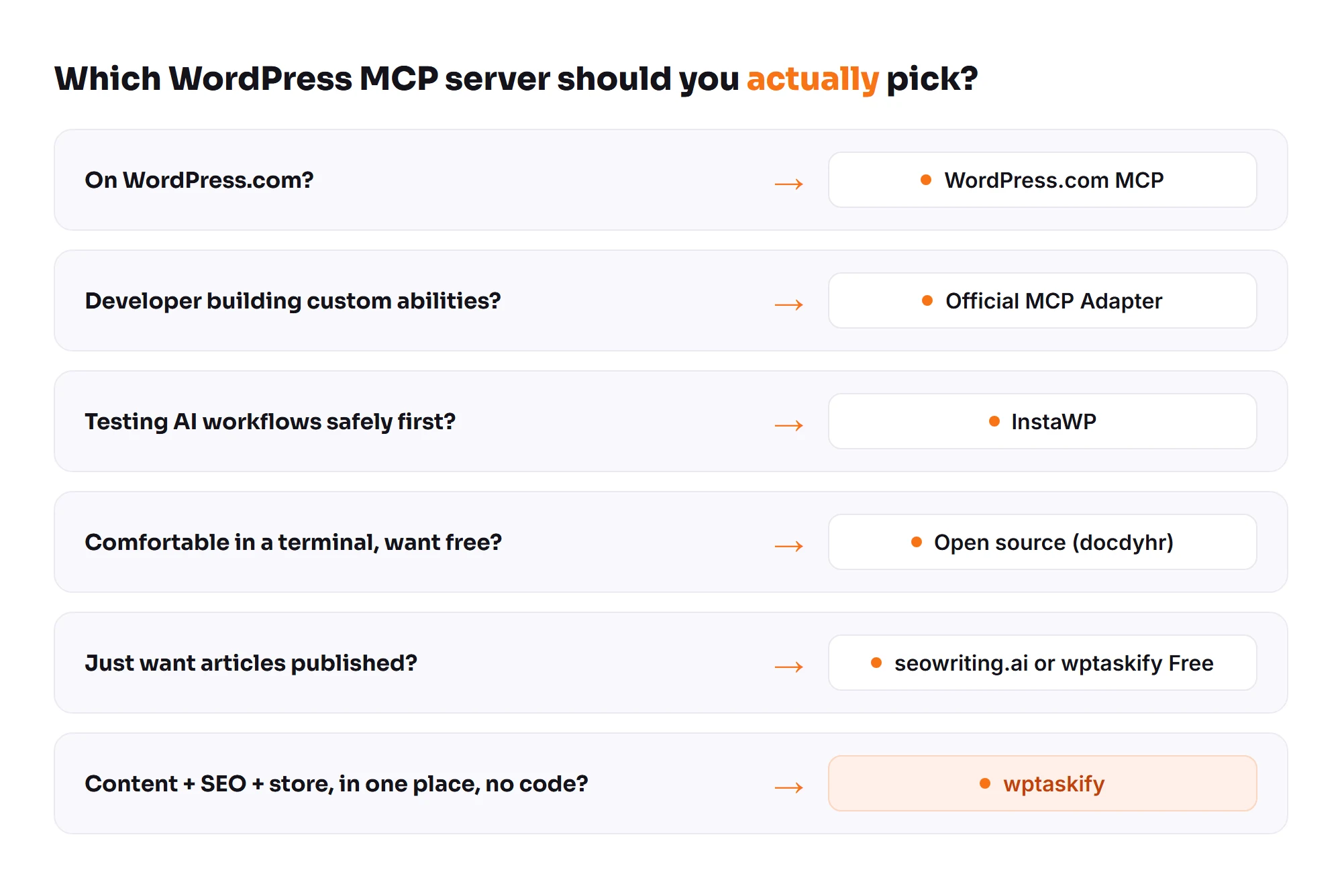
Skip the marketing and match the tool to your situation.
- On WordPress.com? WordPress.com MCP. Do not look further.
- Developer building custom abilities? The official WordPress MCP Adapter.
- Testing AI workflows safely first? InstaWP.
- Already using AI Engine? Switch on its MCP.
- Want free and self-hosted with an audit log? Royal MCP or Easy MCP AI.
- Agency or team that needs role-based permissions? miniOrange.
- Comfortable in a terminal, want free, can maintain it? Open source (docdyhr/mcp-wordpress).
- Just want articles? seowriting.ai or wptaskify Free.
- Content, SEO and store in one place, no code? wptaskify.
What to check before you connect any MCP server
Whichever one you pick, run through this list first. It saves the most common surprises.
- Write access. Can the server only read, or can it write too? Some connectors have been read-only in certain clients. Do not assume.
- Auth method. Application Password versus OAuth. OAuth is safer because you can revoke it without changing your login.
- Approval flow. Will the AI publish directly, or do you approve changes first? For a live site, an approval step is worth having.
- Backups. Does it back up a file before editing it? File edits without a backup are how sites break.
- Scope creep. More tools means more surface area. Do not grant more permissions than the job needs.
Practical advice: do not point a brand-new MCP server at a production site on the first try. Test on staging. If you hit a wall, our notes on 401 and 403 connection errors cover the usual causes. Once you are set up, you can also auto-publish AI articles and make sure your content is written to get cited by AI search engines.
The short version
The WordPress MCP space is moving fast. The official adapter is becoming the foundation, and the purpose-built tools each solve a specific workflow. Pick the one that matches your situation rather than the one with the loudest pitch.
If you want the store, SEO and content side handled without writing code, wptaskify has a free tier. Connect a site and try it.