Quick answer
Two published walkthroughs, two completely different methods, both ending in a working WordPress site. Watching them back to back is more useful than watching either one alone, because the differences are the actual decision you have to make.
The first is Ferdy Korpershoek building a site through Elementor's MCP integration, instructing Claude step by step over several hours. The second is a Hostinger tutorial using ZipWP, where one description of the business produces a complete site in minutes.
Neither is the better tool. They are answers to different questions, and choosing the wrong one is what wastes the weekend.
1. What each method actually is
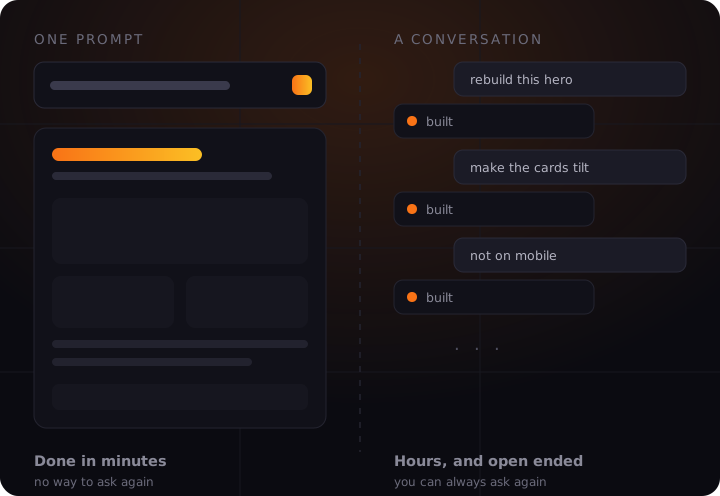
The one prompt method asks for a description of your business, refines that description, then generates everything at once: pages, copy, images, contact form, blog. You watch a progress bar. What comes out is what you get.
The conversation method has no generate button. You describe one thing, it appears, you correct it, you describe the next thing. In the recorded build that meant screenshotting a layout, handing it over, asking for a rebuild, then asking for the counter animation to run in a different order.
The difference is not speed. It is whether you can still ask for something after the site exists.
2. The comparison that matters
| Question | One prompt | Conversation |
|---|---|---|
| Time to a live site | Minutes, once setup is done | Hours, and it stays open ended |
| Cost shape | Credits, roughly fixed per site | Tokens per instruction, so it depends on you |
| Changing it later | By hand, in the page builder | Ask again in plain words |
| Where the design comes from | Preset previews you pick from | References you supply |
| Where the images come from | Stock library, chosen at setup | Whatever you upload |
| Where the words come from | Written for you from a description | Written for you, then argued with |
| Skill assumed | None, until you want a change | Enough to know what to ask for |
The row that decides it is the third one. Everything else is preference. Whether you can change the site by asking, or have to open a builder and do it yourself, is the difference you will live with for as long as the site exists.
3. Setup is not counted in either claim
Both walkthroughs open with a number. Five minutes for one, around twenty one dollars for the other. Neither number includes what happens before the AI runs.
In the one prompt tutorial, the steps before any AI ran were: buy hosting, register a domain, install WordPress, install a specific theme, then bulk deactivate and delete the default plugins the host had installed, because they interfere with the builder. Then create an account with the AI service, install its plugin, and connect the two.
In the conversation build, setup was smaller but the interruptions were larger: custom post types the AI could not create, three empty templates that had to exist before it could fill them, and JavaScript it wrote but a person had to paste in.
We counted those in detail in what AI website builders actually leave for you to do. The short version is that the AI is fluent inside its own surface and blocked everywhere outside it, and that holds for both methods.
4. Myths and facts
The fast method has no downside
It produces a real site quickly. It also decides the layout, the words and the images for you, and hands you a page builder when you disagree. That is a fair trade if you would not have opened a builder anyway, and a poor one if you have specific ideas.
The conversation method is only for developers
The recorded build was done by someone who says plainly he is not a coder. What it needs is not code, it is the ability to describe what you want precisely. Vague instructions produce vague results, which is a writing skill, not a technical one.
You can start fast and switch later
You can, but not for free. A site generated in one pass is a normal site afterwards, so switching to a conversational tool means it now has to read and edit somebody else's markup rather than its own. Easier to choose once.
Stock photography is a real cost
The fast method asks you to pick at least ten stock images during setup. For a local business that is a visible weakness: the photographs on the site are of somewhere else, and customers notice before search engines do.
Description quality decides output quality
Both methods rise and fall on how well you describe the business. One asks for it once at the start, the other asks continuously. Neither invents a good answer from a thin brief.
Both leave you with WordPress
Whatever built it, you end up owning a WordPress install with a theme, plugins and updates. That is a genuine advantage over a closed platform, and it is also work that does not disappear because AI wrote the pages.
5. Which one to choose
Answer these honestly rather than optimistically.
- Do you already know what the site should look like? If you can point at a reference, the conversation method uses that directly. If you cannot, the preset previews of the fast method will get you further than a blank prompt will.
- How often will it change? A site you revise monthly is worth the slower setup, because changing it stays conversational. A site that goes up once and sits there is not.
- Do you have real photographs? If yes, that alone argues against a stock library. If no, stock images are honest enough for now, and worth replacing later.
- Who maintains it in six months? If that is you and you are comfortable in a page builder, either works. If it is you and you are not, choose the one where changes are a sentence.
- What is your actual budget shape? Fixed credits are easier to predict. Tokens per instruction reward being decisive and punish fiddling, which is worth knowing about yourself before you start.
6. What neither method solves
Both produce pages. Neither produces the thing the pages exist for.
The facts about your business. Real address, real hours, real prices, real services. Invented ones are worse than missing ones, because a wrong phone number sends calls nowhere and damages local search at the same time.
Proof that you are any good. Reviews, credentials, photographs of actual work. No generator has these.
A reason to choose you. Both methods write competent copy about what you do. Neither knows why a customer should pick you over the business down the road.
Getting found. A generated site is not an optimised site. See AI SEO for WordPress for what actually has to be true on the page.
Being cited by AI engines. Ranking and being quoted are now separate problems, covered in getting cited by ChatGPT and Perplexity.
Publishing anything after launch. A site with six pages and no new content stalls. That is the case for publishing on a schedule.
7. The honest summary
If you need a site to exist by Friday, want the decisions made for you, and will not be changing much, the one prompt method is the correct answer and the speed is real.
If the site has to look like something specific, and you expect to keep changing it, the conversation method is worth the extra hours, because those hours buy you the ability to keep asking rather than keep editing.
What both share is the part nobody puts in a thumbnail: the generation is the quick bit. The setup around it, the facts only you have, and the work of getting the thing found afterwards are where the time actually goes.
Where we sit. wptaskify is the conversational kind, with the setup removed: no plugins to configure, no templates to pre create, no code to paste, because the AI controls the whole site rather than one builder inside it. You bring your own Claude or ChatGPT, so the usage is on your account and you choose what to spend on which task. What you give up is the WordPress plugin ecosystem. If you need a specific plugin, one of the tools above is a better fit than we are, and we would rather say so now.
Sources: Ferdy Korpershoek's published walkthrough of the Elementor MCP integration, and Hostinger's published ZipWP tutorial. Setup steps, costs and limitations above are taken from those recordings. Both tools are actively developed and some of these limits will move.